

Introduction
How to Use WhatsApp Business for Small Business is one of the most searched topics by business owners in 2026.
Today, millions of customers prefer to contact businesses through WhatsApp because it is fast, simple, and free.
Whether you run a local shop, online store, digital agency, coaching business, or freelance service, WhatsApp Business can help you connect with customers more professionally.
In this guide, you will learn How to Use WhatsApp Business for Small Business step by step in easy English. Also, you will understand the best features, setup process, and practical tips that work for both Indian and global businesses.
For example, if a customer wants to ask about your product, price, or delivery, they can simply send a message. Therefore, you can reply quickly and build trust.
In addition, WhatsApp Business helps you organize chats, show products, and provide better customer support without extra cost.
If you are a beginner, don’t worry. This guide explains everything in simple language.
How to Use WhatsApp Business for Small Business is easier than ever in 2026 because the app offers beginner-friendly tools that help improve customer communication, build trust, and increase sales for businesses of every size.
What is WhatsApp Business
How to Use WhatsApp Business for Small Business starts with understanding what WhatsApp Business actually is.
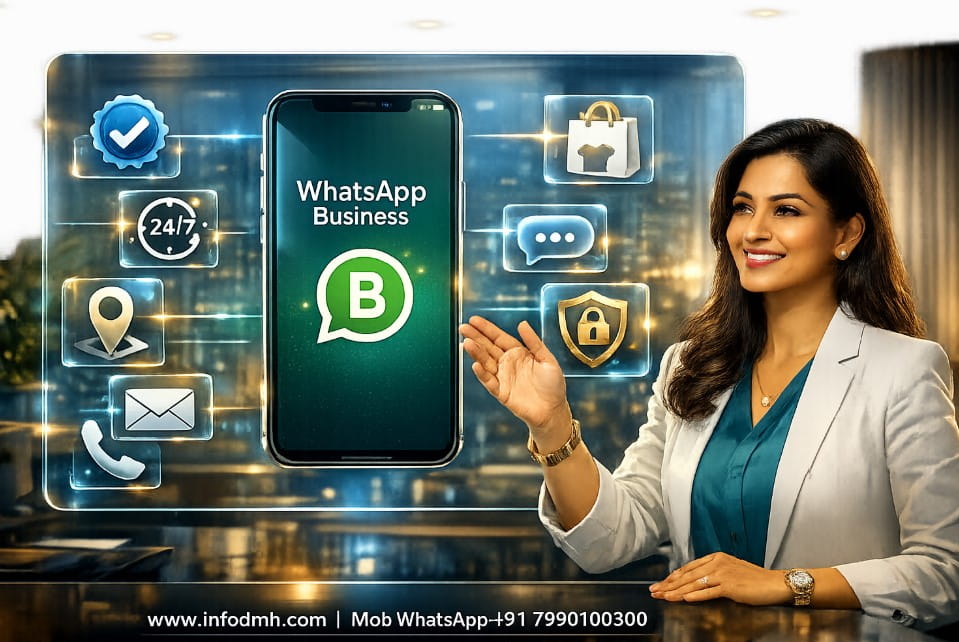
WhatsApp Business is a free application designed especially for small businesses.
It helps business owners communicate with customers in a professional way. Unlike the normal WhatsApp Messenger, this app includes business tools that save time and improve customer service.
For example, you can:
- Create a professional business profile.
- Display your products using a catalog.
- Set automatic welcome messages.
- Send away messages when you are offline.
- Organize customers with labels.
- Share your business hours and location.
Because these features are built for businesses, customer communication becomes easier and more professional.
| Download the Official WhatsApp Business App from WhatsApp to access the latest features, business tools, and secure messaging for your small business. |
Why Learn How to Use WhatsApp Business for Small Business in 2026
Learning How to Use WhatsApp Business for Small Business is important because customer behavior has changed. Most people now prefer messaging instead of calling or emailing.
Here are the biggest benefits:
- Fast communication with customers.
- Professional business profile.
- Free marketing channel.
- Better customer support.
- Higher customer trust.
- Easy product promotion.
- Faster order confirmation.
- Improved customer satisfaction.
Also, businesses can respond quickly, which increases the chances of making a sale. However, simply installing the app is not enough. You must use its features correctly to get the best results.
After setting up WhatsApp Business, you can automate customer communication using the Best AI Marketing Tools to improve marketing, save time, and increase conversions.
Businesses that understand How to Use WhatsApp Business for Small Business can respond faster, provide better customer support, and create a more professional experience that encourages repeat customers.
To improve your online visibility, create a Google Business Profile along with WhatsApp Business. It helps customers find your business on Google Search and Google Maps, making it easier to contact you, read reviews, and visit your website.
WhatsApp Messenger vs WhatsApp Business
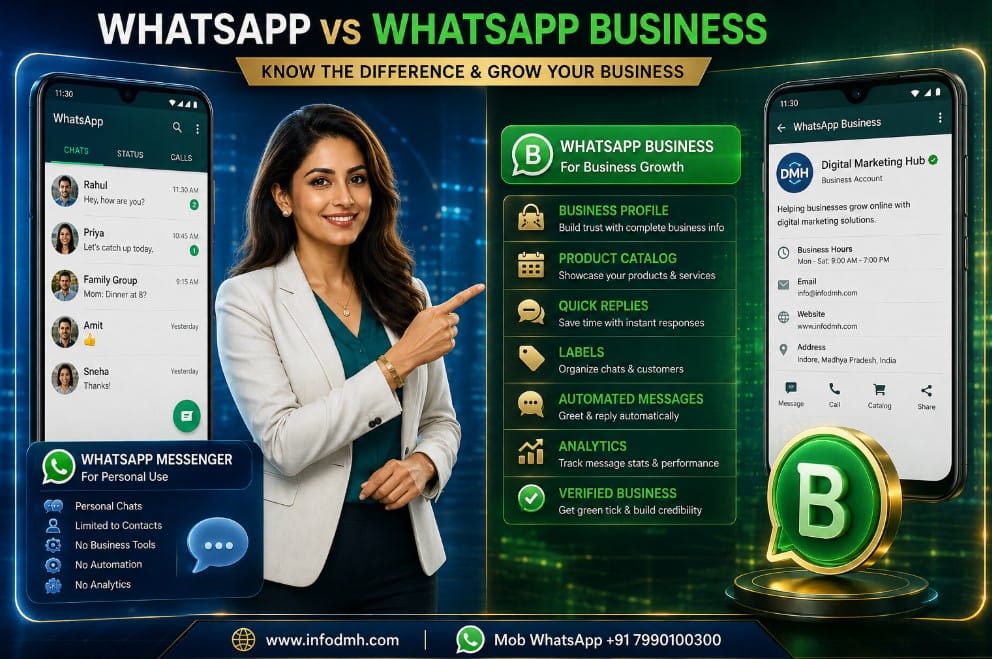
Before learning How to Use WhatsApp Business for Small Business, understand the difference between the two apps.
| Feature | WhatsApp Messenger | WhatsApp Business |
| Personal Chats | ✅ | ✅ |
| Business Profile | ❌ | ✅ |
| Product Catalog | ❌ | ✅ |
| Auto Replies | ❌ | ✅ |
| Away Messages | ❌ | ✅ |
| Labels | ❌ | ✅ |
| Business Hours | ❌ | ✅ |
| Quick Replies | ❌ | ✅ |
Best Choice: If you own any business, WhatsApp Business is the better option because it offers professional tools that save time and improve customer experience.
Top Features You Should Know Before You Use WhatsApp Business
To understand How to Use WhatsApp Business for Small Business, you should know the main features available inside the app.
| Visit the WhatsApp Business Help Center to learn about catalogs, quick replies, labels, business profiles, and troubleshooting directly from WhatsApp. |
1. Business Profile
Create a complete business profile with:
- Business Name
- Logo
- Description
- Address
- Website
- Business Hours
A complete profile increases customer confidence.
2. Product Catalog
Instead of sending product photos one by one, you can create a digital catalog.
Each product can include:
- Product Image
- Product Name
- Price
- Description
- Product Link
For example, a clothing store can display shirts, jeans, shoes, and accessories in one place.
3. Quick Replies
Many customers ask the same questions.
For example:
- What is the price?
- Do you deliver?
- What are your business hours?
Instead of typing every time, Quick Replies let you answer instantly.
Therefore, you save time and provide faster customer service.
4. Automated Messages
WhatsApp Business allows automatic messages such as:
- Welcome Messages
- Away Messages
For example, if someone messages your business at midnight, they automatically receive a polite reply saying you will respond during business hours.
This keeps customers engaged even when you are unavailable.
5. Customer Labels
Labels help organize chats.
Examples include:
- New Customer
- Payment Pending
- Order Confirmed
- VIP Customer
- Completed Order
Because everything stays organized, managing hundreds of customers becomes much easier.
Step-by-Step Guide-How to Use WhatsApp Business for Small Business
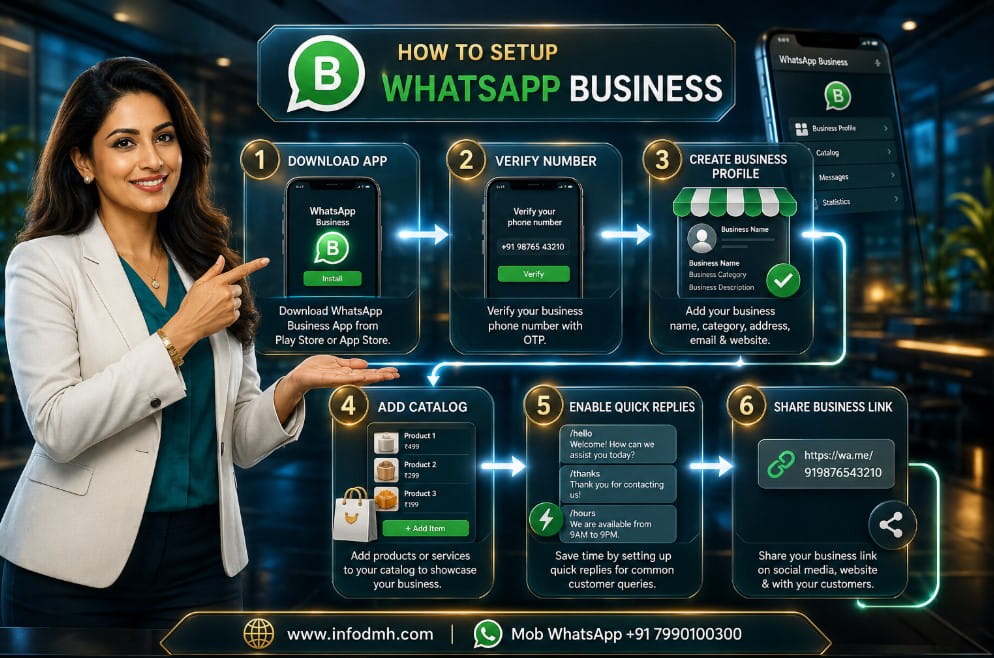
Now let’s begin the practical setup.
Step 1 Download WhatsApp Business
The first step in How to Use WhatsApp Business for Small Business is downloading the app.
You can install it from:
- Google Play Store (Android)
- Apple App Store (iPhone)
Always download the official application published by WhatsApp.
Step 2 Register Your Business Number
Open the app and enter your mobile number.
You can:
- Use a new business number, or
- Use your existing business number.
However, many businesses prefer a separate number because it keeps personal and business chats separate.
After entering your number, verify it using the OTP sent by WhatsApp.
Step 3 Create Your Business Profile
This is one of the most important parts of How to Use WhatsApp Business for Small Business.
Fill in every detail carefully:
- Business Name
- Business Category
- Logo
- Description
- Website
- Email Address
- Store Address
- Business Hours
A complete profile makes your business look more trustworthy and professional.
Need a professional business logo? Learn How to Use Canva for Beginners to create high-quality logos, WhatsApp profile images, product banners, and marketing graphics without design experience.
Step 4 Add Your Business Logo
Your logo is your business identity.
Use:
- High-quality image
- Square format
- Clear branding
- Professional design
Avoid blurry or low-quality images because first impressions matter.
Step 5 Write a Professional Business Description
Finally, write a short description explaining what your business offers.
For example:
We help businesses grow with Digital Marketing, SEO, AI Tools, Website Development, and Online Business Solutions.
Fast support and trusted service for clients worldwide.
Keep the description simple, clear, and customer-friendly. This helps visitors quickly understand your business and encourages them to start a conversation.
Step 6 Set Up Automated Messages
The next step in How to Use WhatsApp Business for Small Business is enabling automated messages. These messages save time and improve customer experience.
You can create:
- Welcome Message – Sent automatically to new customers.
- Away Message – Sent when your business is closed.
- Greeting Message – Makes customers feel welcomed.
Example Welcome Message-
Hello Thank you for contacting us. We appreciate your message and will reply as soon as possible. Have a great day
Because customers receive an instant response, they know their message has been received.
Step 7 Create a Product Catalog
A product catalog allows customers to view your products without asking for images one by one.
While learning How to Use WhatsApp Business for Small Business, creating a catalog is one of the most valuable steps.
Your catalog should include:
- Product Image
- Product Name
- Price
- Short Description
- Product or Website Link
Learning How to Use WhatsApp Business for Small Business also means keeping your product catalog updated with accurate prices, descriptions, and high-quality images to help customers make informed buying decisions.
For example, if you sell digital services, you can create catalog items for SEO, Website Design, AI Services, Social Media Marketing, and Digital Marketing Packages.
A well-organized catalog saves time and helps customers make faster buying decisions.
Step 8 Organize Customers with Labels
Another important part of How to Use WhatsApp Business for Small Business is using Labels.
Labels help organize conversations.
Examples include:
- New Lead
- New Customer
- Payment Pending
- Order Confirmed
- Completed Order
- VIP Customer
For example, if someone has already paid, you can quickly find them under the “Completed Order” label.
Therefore, managing many customer chats becomes much easier.
Step 9 Use Quick Replies
Many customers ask the same questions every day.
Instead of typing the same answers repeatedly, WhatsApp Business allows you to save Quick Replies.
Examples:
- Business Hours
- Payment Methods
- Delivery Information
- Product Pricing
- Website Link
This feature helps you reply within seconds and improves customer satisfaction.
Step 10 Share Your WhatsApp Business Everywhere
The final setup step in How to Use WhatsApp Business for Small Business is promoting your WhatsApp contact.
Add your WhatsApp Business link to:
- Your Website
- Facebook Page
- Instagram Profile
- LinkedIn Profile
- YouTube Description
- Google Business Profile
- Email Signature
- Digital Business Card
The easier customers can contact you, the more business opportunities you can receive.
Best Use Cases of WhatsApp Business
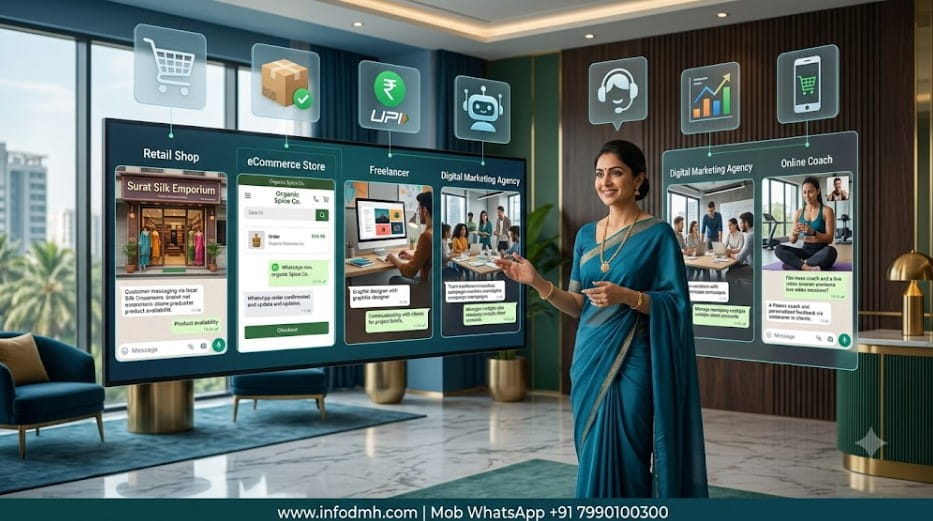
Once you understand How to Use WhatsApp Business for Small Business, you can use it in many industries.
| Freelancers can use WhatsApp Business to manage clients professionally. Read our guide on Freelancing with AI Tools to build a successful freelance business in 2026. |
Local Shops
Share product photos, confirm orders, and answer customer questions.
E-commerce Stores
Send order confirmations, shipping updates, and customer support messages.
Digital Marketing Agencies
Share service details, proposals, and project updates with clients.
Coaches and Trainers
Provide course information, schedules, study materials, and reminders.
Freelancers
Communicate with clients, send quotations, receive project requirements, and offer support.
These use cases show that WhatsApp Business works for almost every type of small business.
Whether you own a retail shop, service agency, or online business, How to Use WhatsApp Business for Small Business can simplify customer communication and improve overall business efficiency.
Common Mistakes to Avoid
Even after learning How to Use WhatsApp Business for Small Business, many business owners make simple mistakes.
Avoid these common errors-
- Using an incomplete business profile.
- Not adding a professional logo.
- Ignoring customer messages.
- Sending too many promotional messages.
- Not updating the product catalog.
- Forgetting business hours.
- Mixing personal and business chats.
- Never using labels or quick replies.
However, avoiding these mistakes helps create a better customer experience and builds long-term trust.
Personal Recommendation
After using and studying How to Use WhatsApp Business for Small Business, my recommendation is simple.
First, complete your business profile with accurate information. Next, create a professional product catalog and enable automated messages. Also, organize customer chats with labels and use quick replies to save time.
In addition, connect WhatsApp Business with your website and social media profiles.
Because customers prefer fast communication, this simple strategy can improve customer engagement and increase sales.
Finally, remember that success comes from providing quick responses, helpful information, and professional service-not from sending too many promotional messages.
My advice is to practice How to Use WhatsApp Business for Small Business every day by using automation, quick replies, and customer labels to save time and deliver excellent customer service.
| You can combine WhatsApp Business with AI-powered customer support and content creation. Read Earn Money with ChatGPT to discover more online business opportunities. |
Conclusion
Learning How to Use WhatsApp Business for Small Business is one of the smartest decisions for entrepreneurs in 2026.
It helps you communicate faster, build customer trust, organize conversations, and promote products professionally.
Whether you run a local business, online store, coaching center, agency, or freelance service, WhatsApp Business offers simple tools that improve customer support and business growth.
Start by creating a complete business profile, setting up automated messages, organizing chats with labels, and maintaining an updated product catalog.
WhatsApp Business works even better when combined with the Best Digital Marketing Tools for SEO, email marketing, social media, automation, and lead generation.
By following this guide on How to Use WhatsApp Business for Small Business, you can improve customer relationships, increase response speed, and create a professional brand image that works for both Indian and global audiences.
If you follow this complete guide on How to Use WhatsApp Business for Small Business, you will be better prepared to attract customers, improve communication, and grow your small business successfully in 2026 and beyond.
related
- Best Sales Funnel Software for Small Business in 2026 – Complete Guide
- Best Lead Generation Funnel Tools for Agencies in 2026 (Top 7 Compared)
- Best E-commerce Platforms for Small Business in 2026 | Top 10 Compared
- Best Payment Gateway for Indian Businesses in 2026 | Top 10 Compared
- Best SEO & Content Tools for Bloggers & Businesses (2026 Complete Guide)
Start Growing Your Business Today – CTA

Ready to grow your business with WhatsApp Business
Start applying these tips today and turn every customer conversation into a business opportunity.
Explore more beginner-friendly digital marketing, AI, SEO, and online business guides on InfoDMH to keep learning and growing your business in 2026 and beyond.
Digital Marketing Hub,
Web www.infodmh.com,
Mob Whatsapp +91 7990100300,
Mail info.globaldmh@gmail.com,
Frequently Asked Questions (FAQs)
1. What is WhatsApp Business, and how is it different from WhatsApp Messenger
WhatsApp Business is a free app designed for businesses. It includes features like a business profile, product catalog, quick replies, automated messages, and customer labels. In contrast, WhatsApp Messenger is mainly for personal communication.
2. How to Use WhatsApp Business for Small Business
To use WhatsApp Business for a small business, first download the app, verify your business number, create a professional profile, add your products to the catalog, set up automated messages, use quick replies, organize chats with labels, and share your WhatsApp link on your website and social media.
3. Is WhatsApp Business free to use
Yes. WhatsApp Business is completely free to download and use for small businesses. Most essential features are available without any subscription, making it an excellent choice for startups and entrepreneurs.
4. Can I use my existing mobile number for WhatsApp Business
Yes. You can register your existing business number or use a new number. However, using a dedicated business number helps keep personal and business conversations separate.
5. Who should use WhatsApp Business
WhatsApp Business is ideal for local shops, online stores, freelancers, digital marketers, consultants, coaches, restaurants, healthcare clinics, and any small business that wants to communicate professionally with customers.
6. How can WhatsApp Business help increase sales
WhatsApp Business helps increase sales by providing instant customer support, showcasing products in a catalog, sending automated replies, sharing offers, confirming orders quickly, and building customer trust through professional communication.
7. Why should I read – How to Use WhatsApp Business for Small Business in 2026 – 15 Powerful Tips to Boost Sales & Avoid Costly Mistakes
This guide provides beginners and business owners with practical, step-by-step instructions to set up WhatsApp Business, use its best features, avoid common mistakes, and improve customer engagement. It is suitable for both Indian and global audiences.
8. What are the biggest mistakes to avoid while using WhatsApp Business
Some common mistakes include leaving your business profile incomplete, not updating your product catalog, ignoring customer messages, sending too many promotional messages, and not using automation features like quick replies and away messages.

This guide on How to Use WhatsApp Business for Small Business is very easy to understand. I successfully created my business profile, added a product catalog, and set up automated replies. The step-by-step instructions are perfect for beginners. Thank you for sharing such a helpful article!
Excellent article! I was searching for How to Use WhatsApp Business for Small Business and found everything I needed in one place. The comparison table, practical tips, and common mistakes section were especially useful. Looking forward to reading more digital marketing guides from InfoDMH.